How to Close a Balance
Result: how to close a balance with a subcontractor, done: a person's open jobs are paid, the PDF is in their hands, and their balance reads zero. Time: two minutes a person.
What You Need First
- Jobs that are closed, with their money on them: payments, parts, and a cut.
- The money actually handed over, in cash, Zelle, a check or however you pay.
Decide the format before you start. A PDF is what most people hand over. A CSV is easier if your sub keeps his own books. Either way, the figures on the page are the figures in the file, so he can check them against his own count of the week.
Steps
Here is how to close a balance with a subcontractor, in six steps.
- Open Finance. It opens on Close balance.
- Find the person under the week. The row shows their job count, a badge and the amount. Read the words under it: you owe or they owe.
- Press the row's arrow. You see the jobs behind the figure. A job that is not closed yet is not in the amount.
- To keep one job out of this payment, open that job's Money tab and set the person's Balance close to Held back.
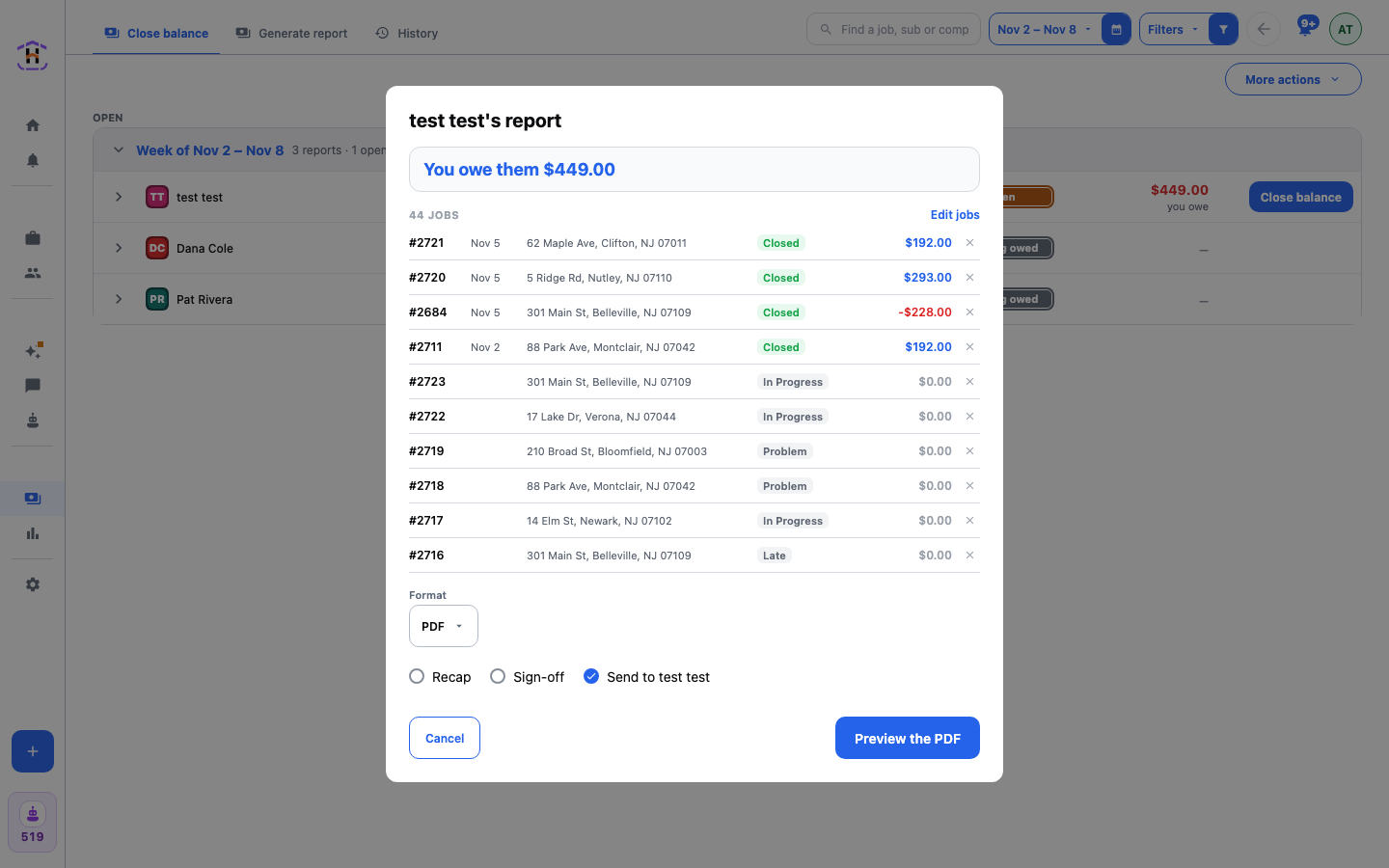
- Press Close balance on the row. The dialog opens with the person's name, the amount, such as You owe them $449.00, and the list of jobs. Press the cross beside a job to leave it out.
- Pick the Format. Tick Recap or Sign-off if you want them. Send to the person is ticked for you.
- Press Preview the PDF and read the sheet. Press Approve · close the balance. The balance closes and the statement is kept. Pay the person. With CSV the button reads Close the balance · CSV and closes at once.
How You Know It Worked
The person leaves the list, or, when nothing is open at all, the board says All balances are closed. History has a new row. The jobs move to Balanced.
If It Fails
- The amount looks wrong. Open one job and read its Money tab working. Fix a payment or part there, and the figure fixes itself.
- You closed the wrong one. In History, open the row's menu. Void report releases every job. Take a job out removes one job. Both ask why.
- The sheet says nothing is in the report. The jobs wait until they close. Close the jobs first.
Want it to run on its own? Under Actions, Auto report can close and send each person's report every week. See Finance, Splits and Payouts.