How to Set Up a Subcontractor Split
To set up contractor split pay, pick the cut basis, type the number, close the job, and read the balance. Percent of total, percent of profit or a fixed amount, set once on the person.
Result: a sub or tech with a default cut, a job-by-job override when you need one, and a balance you can read. Time: five minutes.
What You Need First
- The agreement with your sub, in numbers: a percent and what it is a percent of. If it is not written down, do that first.
- Whether parts come out first. That decides between the two percent choices.
Steps to Set Up Contractor Split Pay
- Open Team and press Subs. Press Add sub if he is new, or open his row.
- Set Default cut basis to one of three: Percent of job total, Percent of job profit or Fixed amount per job.
- Type the number in Cut value. It is a percent, or dollars per job if you chose fixed. Save.
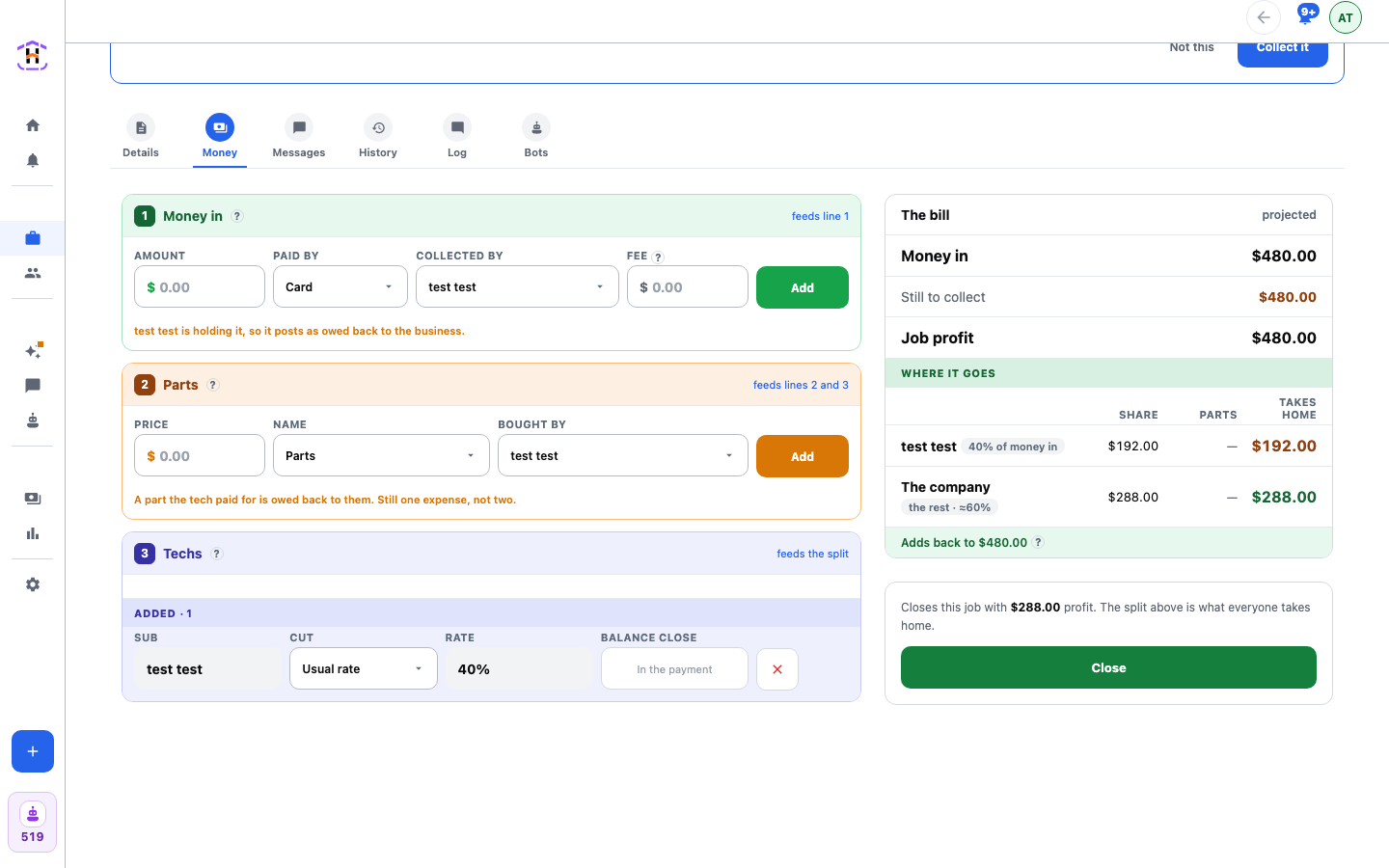
- To change the cut on one job, open the job, press its Money tab, and find Techs. Cut reads Usual rate and Rate shows his default, such as 40%, until you change it. Pick another Cut to set a different basis for this job, and fill in the rate. Usual rate hands the job back to his default.
- On the same tab, use Parts to add each part, with Bought by set to whoever paid. Use Money in to add each payment, with Collected by set to whoever took it.
- Close the job. The cut posts when the job closes, from the job's own terms or his default.
- Open Finance. On Close balance, find the sub. The row says whether you owe him or he owes you.
How You Know It Worked
On an open job, the Money tab shows the cut as a projection. After closing, it is a posted cut. The working lists money in, parts, each share and a check that everyone's take-home adds back to the money in. Example: a 60% cut of profit, on a $1,000 job with $200 of parts, is 60% of $800, which is $480.
Two Edge Cases
- A zero-money job. A canceled job moves no money, so it has no cut. It still counts in the closing rate on the tech's report.
- Parts bigger than the profit. A cut on profit never goes below zero. The sub's own parts are still handed back to him in full.
If It Fails
- The Money tab shows no cut: the sub has no default and the job has no override. Set one.
- The cut looks too big or small: check the basis. Percent of total ignores parts. Percent of profit takes parts and card fees off first.
Every figure is explained on Finance, Splits and Payouts, and the arithmetic by hand is in How to Pay a Subcontractor on a Split.