Four things the system does without you
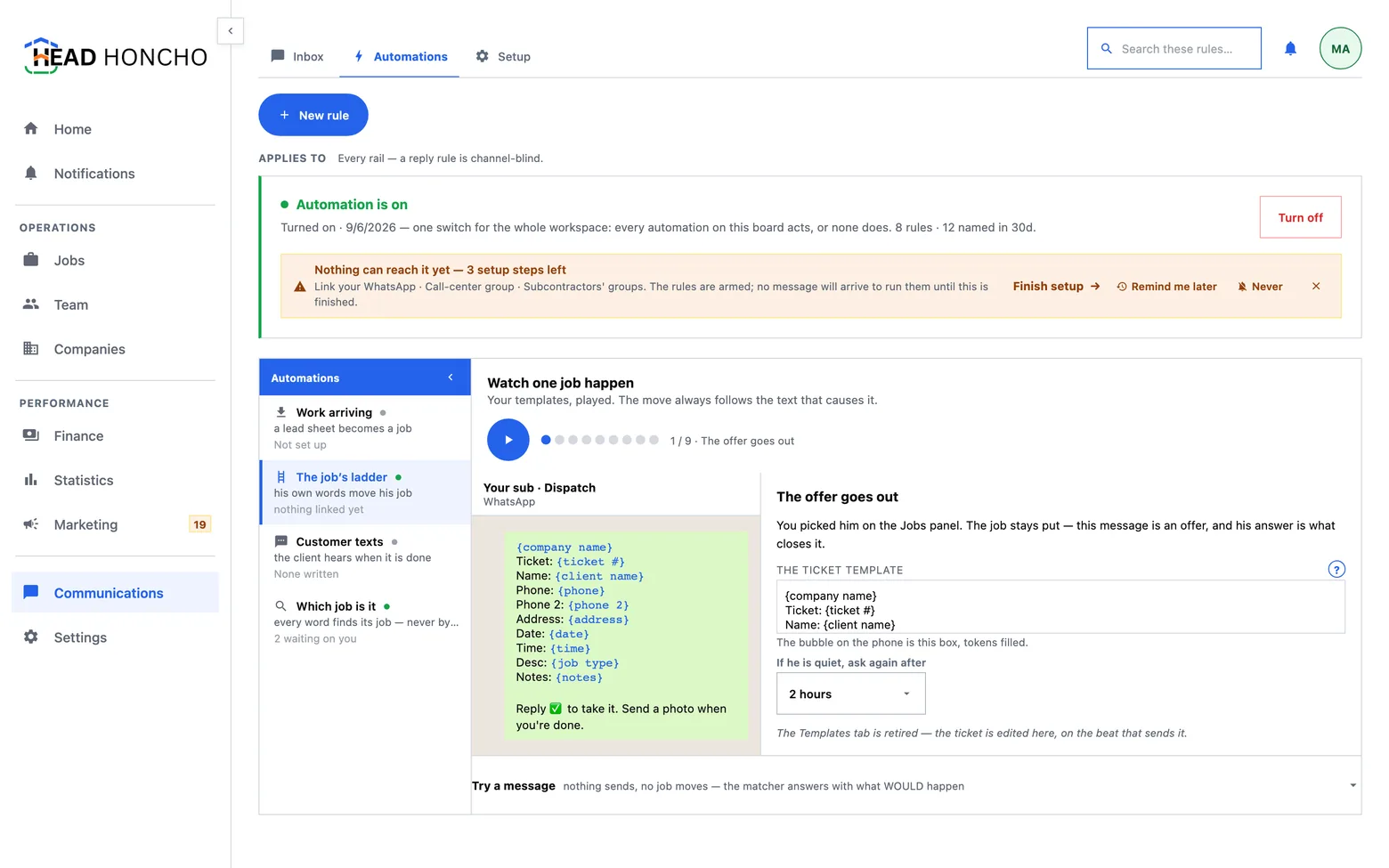
Home service automation here is four named jobs under one organization switch, and each one tells you the exact words it listens for.
The Automations board does not show you a rule builder. It plays the conversation: one afternoon of messages, rendered from your own rules, with the rule that produced each message beside it. Editing the card edits the automation.
One switch, and what off means
Home service automation here is governed by a single switch for the whole workspace, and a new workspace starts with it off. The rules are already written — you are not handed a blank builder — but nothing they can do touches a job until you turn the switch on.
Off is a dry run, not a dead screen. The matcher still runs and the message log still fills; the verdict just reads would have set status to Assigned instead of doing it. Nothing acts, and nothing counts toward a rule's run tally either, because a panel showing run counts for automation that is not on would be telling you it works before it is armed.
Once it is on, the banner becomes the kill switch, naming who turned it on and when. Turning it off leaves every individual rule as you left it, so turning it back on restores your list rather than the factory one.
 1
1
- One switch for the whole workspace. Every automation on this board acts, or none of them does — there is no half-on.
The four stories
| Story | Starts from | What it does |
|---|---|---|
| Work arriving | A filled sheet in the intake destination | Opens a job, unassigned, at the top of the ladder — and answers the sender that it did |
| The job's ladder | A subcontractor's own words in his destination | Moves his job one rung, answers him, and does whatever else that rule's stack says |
| Customer texts | A job reaching your closed rung | Tells the client the work is done, and asks for a review |
| Which job is it | A message that could belong to more than one job | Asks a numbered question rather than guessing, and sends a receipt naming the job it landed on |
Everything the third story describes is written and inert. Texting the people who hired you is a different regulatory animal from texting your own crew — it needs its own registered campaign with the carriers — and until that registration is in force the customer automation sends nothing. The board says so where the story is, rather than letting you discover it from a message that never arrived.
What starts a rule
Four ways, and the last one is the one worth knowing about because it is the only one nobody invited by texting first:
- Words — what he actually texted.
- A photo — any attachment, read before the word rules, because a picture of a finished bathroom is not a word.
- Silence — a rung's wait running out. See the ladder: the wait is per rung, never one number for the whole workspace, because a job sitting unassigned for two hours is a different problem from a job sitting on site for two hours.
- A moment — a time relative to the job. The morning sheet at eight, and an alert at nine if nobody confirmed. Every moment ships off, and a moment never moves a job and never posts money: it asks, tells, or alerts.
What a rule does
A rule is one trigger and an ordered stack of actions, shown as rows rather than hidden as side effects. One word from a subcontractor can mark him as having accepted the job, move the job to the next rung, and answer him — three visible steps, in that order, each of which you can see and change.
The vocabulary of actions includes moving the job, replying, marking the assignment accepted, filing a photo as proof, flagging the job as needing you, and recording a payment the message names. That last one is deliberately narrow: money travels in a taught format, an off-format message records nothing and gets the format back, and a clean amount books with a short hold before it is final.
The words it listens for
The board shows the real defaults, in evaluation order, with the keywords styled as a different material from the prose around them so you can see at a glance what is a word and what is a sentence.
| Read in this order | What it listens for |
|---|---|
| Not done yet (a guard, read first) | not done, not finished, not yet, still working and their neighbours |
| A photo | Any attachment |
| Took it | yes, ok, k, got it, on it, a tick or a thumbs-up |
| On the way | omw, on my way, leaving now, heading over |
| Arrived | arrived, on site, here now |
| Finished | done, finished, completed |
| Can't do it | no, cant, busy, unavailable |
| Anything else | The floor. It lands in the Inbox and a person answers |
Two details that matter in practice. The guard is read first
on purpose: “not done” contains done, and a
matcher that read them in the other order would close jobs that are still
open. And matching is on whole words — k fires on a message
that is k, and not inside kitchen leak.
A rung with no words yet offers to add some rather than showing a warning, and the words you add can point at any status you already have — or mint a new one on the spot, which is often what the words were telling you.
What we write back — including the silences
Every rule carries the message it sends back, written in the same token vocabulary the dispatch ticket uses, so a reply can name the ticket, the client, the address and the time. Two rules deliberately write nothing, and the board draws that as a choice rather than as an unfilled blank:
- Not done yet answers nothing, because replying to it teaches a subcontractor that the robot is listening for the wrong word.
- Anything else answers nothing, because it is going to a person, and an automatic acknowledgement in front of a human reply is two answers to one message.
An empty write-back field is a decision, and it is drawn as one.
Trying a message
The board carries a box you can type a message into. It runs the real matcher through the real path — not a simulation written twice — and prints the verdict that message would actually get. The attempt lands in the message log like any other, so a rules list you can try is something you can evaluate rather than merely accept.
Where a message genuinely could belong to two jobs, nothing is guessed: see which job is this about.