Every conversation, in one place
Business text messaging in HeadHoncho is dispatch messaging: you and your crews, on WhatsApp and SMS, with every thread attached to the job it is about.
Communications is four boards: Inbox, Automations, Templates and Setup. Inbox is where conversations live, Automations is what answers them, Templates is what gets sent, and Setup is where the rails are connected.
What carries a message
Business text messaging in this product means two rails, and both of them are pointed at the people who do your work:
- WhatsApp, by pairing a device — the same way WhatsApp Web does. Pair a dedicated number, never the one your customers call.
- Text messages, from a business number the workspace holds.
Which rails are available is declared by the server rather than hard-coded into the screen, so the product cannot advertise support it does not have. A rail that is not connected says what it is waiting on.
Pairing prints the proof immediately: the number that got paired, and how many groups it can already see. A break in the connection — a logout, a takeover, a client that has gone out of date — arrives as a status with a sentence written for a person rather than as a protocol code.
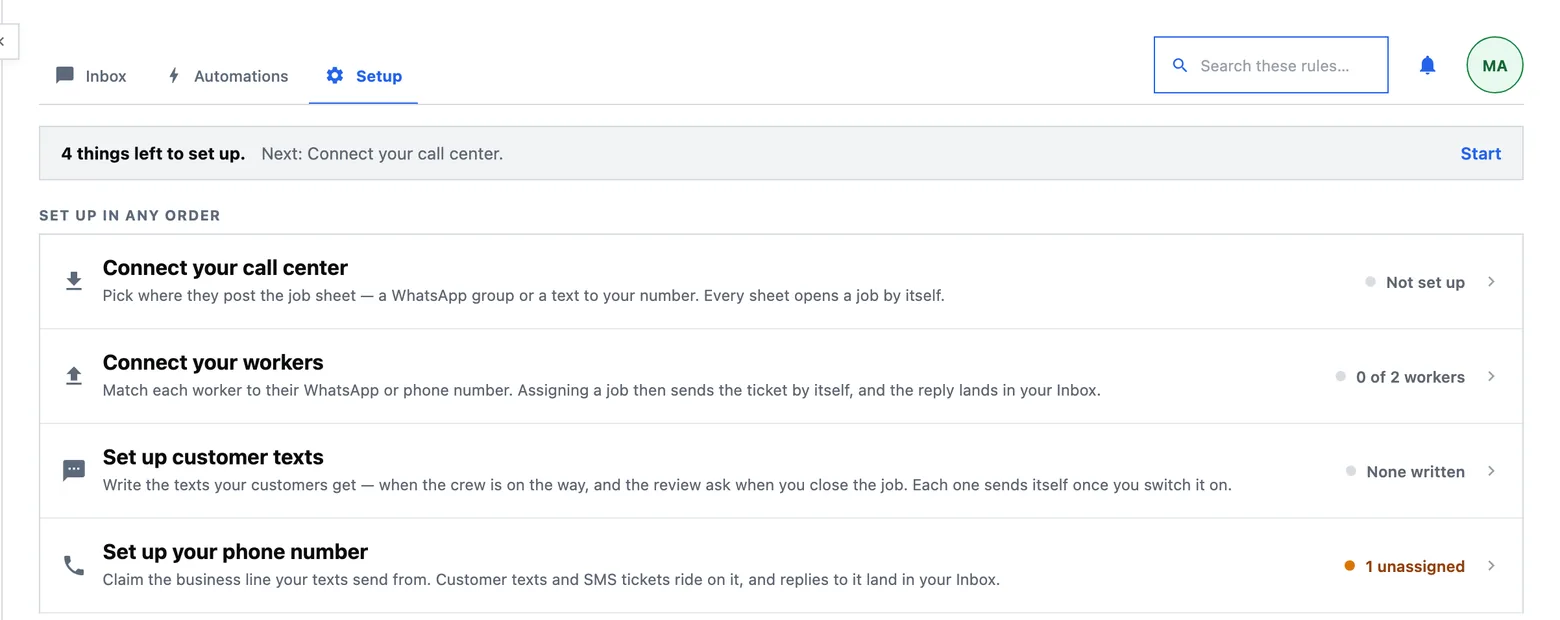
Setup: four doors
Setup is a menu rather than a screen full of controls, and each door opens a page whose whole content is one subject:
- Connect your call center — where new work arrives.
- Connect your workers — where tickets go. A destination belongs to a subcontractor: you pick it, and you say whose it is. Assign that person to a job and the ticket goes there, every time.
- Set up customer texts — see below.
- Set up your phone number — the business number itself.
A subcontractor who is deactivated stops being a destination as well as stopping being assignable. That is not cosmetic: a deactivated person whose group still received tickets would keep being sent work.
 1
1
- Each row is a door and its own state — Not set up, 0 of 2 workers, 1 unassigned. Pressing one opens the real surface it names, never a copy of it; Start at the top opens whichever is next.
The Inbox
Every message is a row: which direction it went, what it said, whether the carrier accepted it, and — for an inbound one — which rule it matched and what that rule did. Conversations are threaded, and a job's own thread is reachable from the job itself, so “the sub never answered” is a question you can settle rather than argue about.
Two properties are worth knowing:
- The log distinguishes “ignored” from “nothing happened”. Both leave the job untouched, and only one of them is the automation working.
- A message that is not sent is a row, never silence. If nothing could carry it — no rail connected, no destination bound for that person — the log says which, in words.
Only bound destinations are recorded at all. A paired number can see chats that are none of the product's business, and an unbound one is dropped before any row exists.
Typing a message yourself is not gated by the automation switch. The switch governs what the rules may do on their own; gating a human typing a sentence would silence you exactly when you have turned the robots off. A message you send records your own name as its sender.
Which job is this about
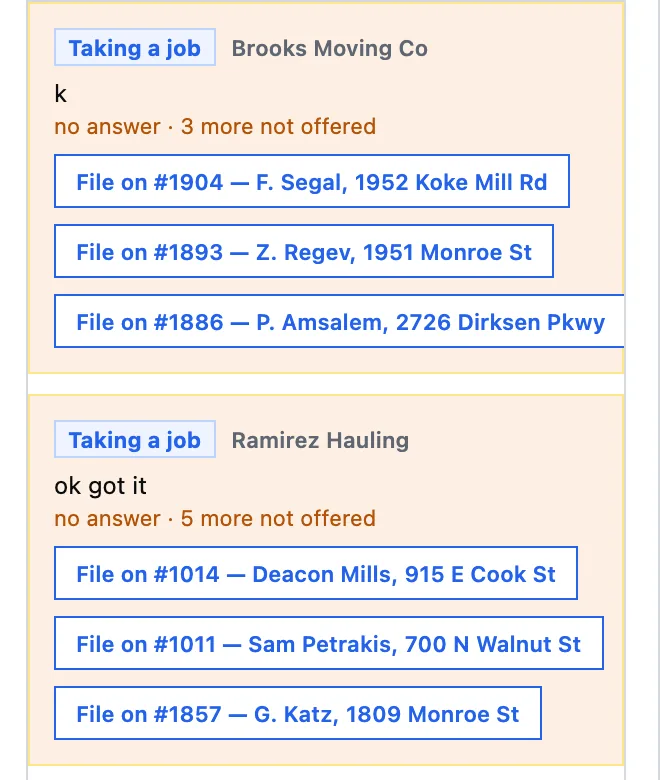
Everything happens in one chat, so a subcontractor working two jobs today will eventually send a message that could belong to either. Nothing is guessed. The product asks a numbered question — which job is that photo for: 1, 2 — and the ordinals it prints stay valid even if the list changes underneath, so an answer typed a minute later still means what it said.
When the message lands, a receipt names the job it landed on and offers the way back: reply no, and it is undone. A message that cannot be tied to a job at all is held — it appears in the Inbox as a question waiting on you, and it is one of the reasons a job board can say something needs you.
The ticket and the sheet
Two documents do most of the talking, and both are yours to edit:
- The dispatch ticket — what a subcontractor receives when a job is assigned to them.
- The intake sheet — the message you give your call centre to fill in, whose reply opens a job.
They are one sheet in two renderings: the same lines, one blank and one filled. Both are edited with a palette of tokens — the ticket number, the client, the address, the date and time, the job type, the notes, the price — and a preview rendered against a real job. Two tokens resolve from your own records at the moment of sending, so a header or a list of job types cannot drift from what actually exists.
Two rules make the sheet readable by a machine without making it unreadable by a person: a line whose token has no value is dropped whole, rather than sent as a label with a blank after it; and each line is one label and one value, with a line whose label is not recognised dropped rather than folded into the line above it. The editor flags, as you type, any line the sheet will not recognise.
A sheet that opens a job is answered — job opened, number such-and-such — back through the same rail it arrived on. Only success answers: a refusal, a duplicate, or the automation switch being off each record their reason and send nothing, so a receipt can never claim a job that was not created.
Consent, and how somebody stops it
Nobody is texted because their number was typed into a form. A worker's number is collected, one verification message is sent, and it is the worker's own reply that turns messaging on for them — the flow is written out in full on the SMS opt-in page, and the program terms are on SMS Program Terms.
Stopping is always available by replying with the standard stop word, and the record of consent is kept even when the person is removed from your roster — with their name taken off it — because the messaging rules require keeping it.
What is switched off today
Everything on this page describes messaging between you and the people who do your work. Texting the customer — the closed-job notice and the review request — is written, seeded, and switched off for the whole organization, because messaging consumers requires its own registered campaign with the carriers, separate from the one that covers dispatch. Until that is in force the customer automation sends nothing, and the board says so where the story is rather than letting anybody find out from a message that never arrived.
Two other honest limits, so nothing here reads as a promise:
- Email and voice are not rails you can send on. They are declared by the server as unavailable rather than hidden, so the shape of the product is visible without a button that cannot work.
- Nothing reads a message for meaning. What lands is the message as it was written, plus the keyword verdict. Rules match words; nothing interprets prose.