The rungs a job climbs, and the waits between them
Your job status workflow is yours to name. HeadHoncho ships no statuses at registration; it recommends six, requires three meanings, and puts a clock on every rung.
A status is a word your business already uses. HeadHoncho seeds none at registration, recommends six on the way in, and needs exactly three meanings to exist under whatever names you give them. Everything else on the list is yours.
Why you choose the words
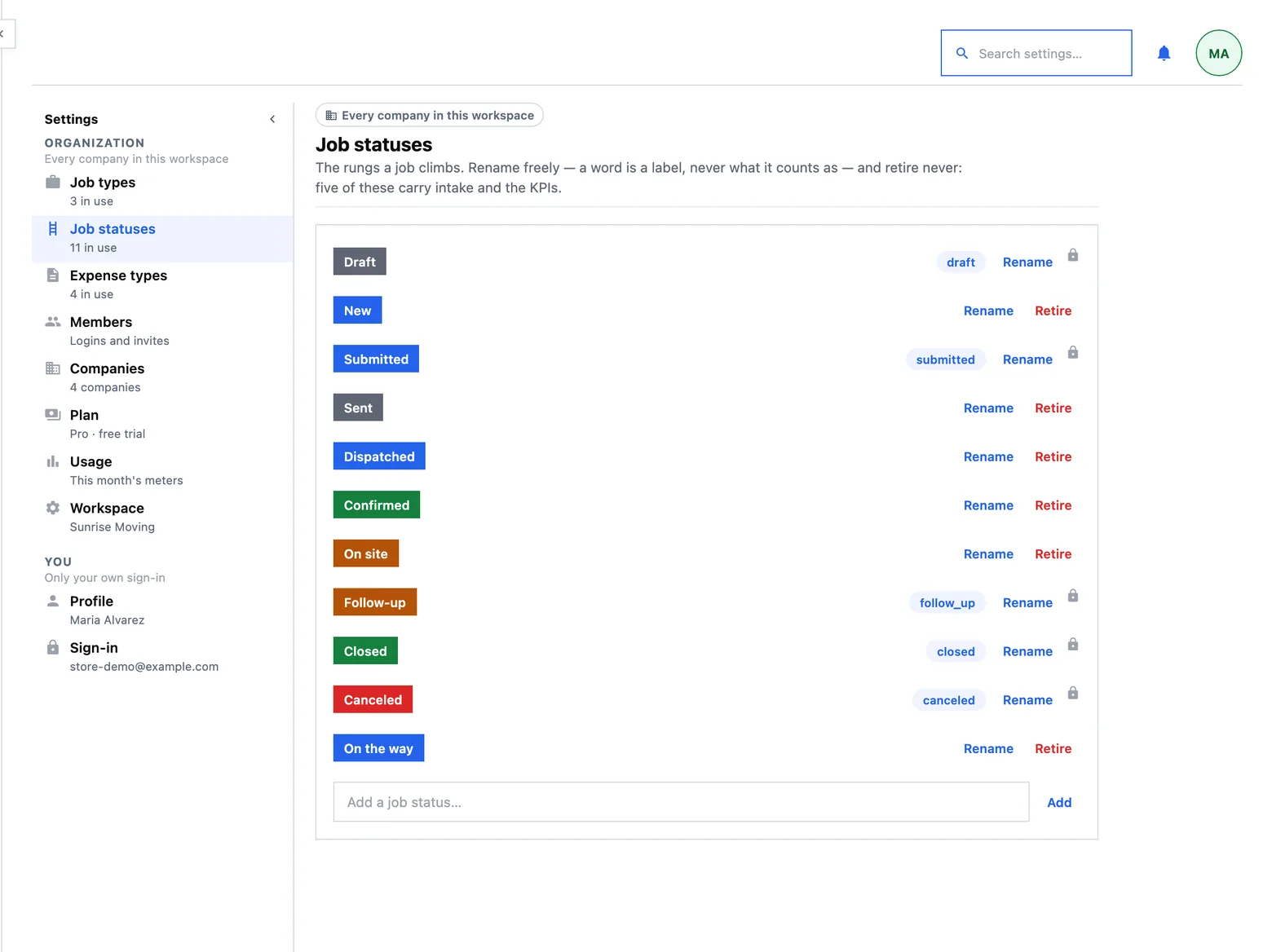
Most products ship a pipeline and ask you to live in it. A new HeadHoncho workspace has an empty status list and the setup step opens on six recommendations, as editable rows: Unassigned, Assigned, On the way, On site, Follow-up, Completed. Rename them, recolour them, drop the ones you do not use, add the ones you do, and the whole list is written once.
This matters more than it looks. A status list is the vocabulary every later number counts in — a closing rate, a payout, a campaign's performance. A list somebody else wrote produces reports in somebody else's words, and then nobody trusts them.
 1
1
- A role, pinned to a rung. The padlock beside it is why that rung can be renamed and recoloured but never retired.
The three meanings the product needs
Your job status workflow can use any names, but three of the rungs carry a role the rest of the product reads. The role survives a rename; it is attached to the row, not to the word.
| Role | Recommended name | What reads it |
|---|---|---|
| draft | Unassigned | Where a call-back or an incomplete intake lands. A job with half an address is a draft, not a refusal |
| submitted | Assigned | Where dispatch puts a job once somebody owns it |
| closed | Completed | What finance, the closing rate and the payroll import all key on |
| follow-up | Follow-up | The board column for work that is waiting on a person rather than on a day |
Two of the recommended six carry no role at all — On the way and On site — and that is deliberate: they are the rungs a subcontractor's own message moves, and they are matched by name. A workspace that drops them simply gets no such rules, and the Automations board offers to put the rungs back rather than assuming.
The ladder: where a job goes next
Each status can carry one rung: where a job on this status goes next, and how long to wait before somebody is nudged. That makes the status list an order rather than a set, which is what lets the Jobs panel print one button per job labelled with the rung below it instead of making you re-derive the pipeline in your head.
The waits above are the defaults the setup step writes from your own row order. They are editable per rung on the Automations board, and a rung with no clock simply never nudges anybody.
What happens when nothing happens
Time passing is the thing a job board is usually worst at. A rung's wait answers it in one of two ways, and you choose which per rung:
- Ask him again. The rung has its own question, in the dispatch ticket's vocabulary, and it is that rung's question rather than a generic nudge — a subcontractor standing in somebody's kitchen should not be asked whether the job is still his. A rung can ask more than once; after the last ask it stops texting and tells you instead.
- Tell you. The job appears on the Needs-you board with No answer beside it. See what needs you.
A wait running out re-asks or tells you. It never changes a job's status, never closes anything and never posts money. Three doors move a job and they are all deliberate: you press the next-step button, the subcontractor's reply matches a rule, or somebody sets the status by hand. A clock that advanced a job on its own would be a product quietly inventing facts about work it cannot see.
Where Canceled comes from
Canceled is not on the recommended list. It is created the first time you cancel a job — and the first time an import brings one in — because a role nobody has needed yet is exactly the row that reads as somebody else's vocabulary sitting in your product. When it is created, cancelling also asks why as free text, so cancellations can be reported by cause and not only by count.
A canceled job still counts in the closing rate as a job that took no money. That is deliberate and it is explained on Finance and payouts.
Adding, renaming, recolouring
Three places edit the same list, through the same commands, so they cannot disagree:
- Settings → Job statuses is the whole list, in order.
- The status cell on the Jobs table ends its menu in Add a new, which opens a name, a fill colour, a text colour and a preview that is the block the table will draw.
- The filter panel can add one while you are filtering.
Rename freely: a name is a label, never what a row counts as. Retiring is a soft archive rather than a delete, because a status that has been used is part of the history of every job that wore it.
What the ladder does not do
- A wait is per rung, not per workspace. There is no single global timeout, and there was not one on purpose — a job sitting unassigned for two hours is a different problem from a job sitting on site for two hours.
- A status you add carries no role. Only the seeded rungs carry the meanings above, so a new status will not become what “closed” counts as. That is the whole point: if minting a status could redefine closed, every KPI in the product would be editable by accident.
- An existing workspace does not gain a ladder silently. The Automations board has an explicit button to adopt it. Nothing about how your jobs move changes underneath you without a press.