The rows behind every number
Marketing raw data is the tab that answers where a figure came from: campaigns, leads, and the receipts drawer that opens from any number on the board.
Every figure on the marketing boards is a summary of rows some provider sent us. Raw data is where those rows are, unsummarised, in the provider's own words — so a number can be checked rather than believed.
The tree of datasets
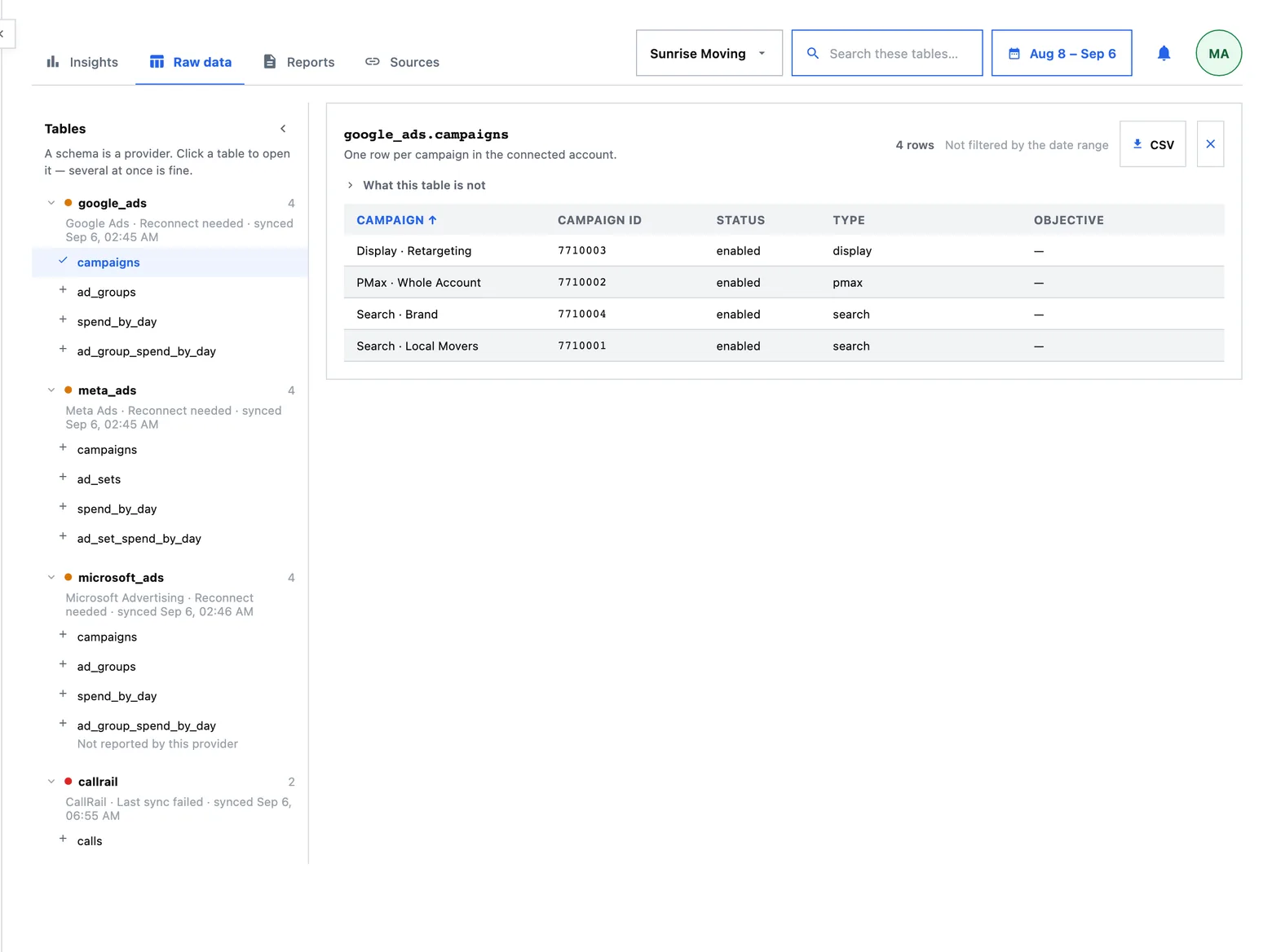
Marketing raw data is organised by who produced the row. Each provider you have connected contributes its own datasets as leaves in one tree — the ad platform's campaigns and daily spend, the call tracker's calls, and everything else those integrations deliver — and picking a leaf shows the rows.
Nothing here is our reading of the data. The columns are the ones the provider sent, with the values it sent, which is precisely what makes this board useful when a client asks where a figure came from.
From a number to its rows
You rarely arrive here by browsing. Three doors lead in, and all three exist because a number that cannot be opened is a number somebody has to take on trust:
- From a figure on the board — a metric opens its receipts, and the receipts lead here.
- From the foot of a report — every report ends with the way down to what it was drawn from.
- From a question's own page — the chart, then the table it came from, then the rows folded in underneath.
You arrive with the same client and the same dates you were reading a moment ago, because a drill-down that resets the window answers a different question from the one you asked.
Scope, dates and search
The board takes the panel's own head. The client selector governs it exactly as it governs the other boards — picking a client re-asks every table for that client's rows. The date lens applies to every dated table, and a dataset that carries no date says so on its own card rather than pretending to be filtered.
The search narrows the tree: which datasets are listed. There is deliberately only one search box on the board, because two fields filtering one list leaves a reader wondering which of them is in force.
With several clients selected at once, this board falls back to showing one company's rows rather than merging them. Picking a single client is exact; the multi-client view is a documented fallback, and it is named here rather than left to be discovered.
What a call row carries
A tracked call arrives with the caller's number, the tracking number they dialled, when it started, and the campaign and source the tracker attributed it to. The provider's whole row is kept alongside the fields we read, because an API keeps only so much history and a field we did not think to store is a field we cannot go back for.
Two things follow that are worth being explicit about:
- The caller's phone number is stored, because it is the thread that ties a call to a booked job. Any report whose export carries it says so on the download control before you press it.
- The tracker's own attribution is stored and is not treated as evidence. The campaign label a call tracker writes is operator-authored text and is frequently wrong; it is kept as what the provider said, and the product's own matching is done separately.
What is not here: nothing is inferred about a caller, no profile is built, and no identifying field is invented that a provider did not send.
Campaigns and leads
The campaign table and the lead list are readings of two of those datasets with our own columns added — booked jobs, cost per booked job, profit after parts and the sub, return on spend, and for a lead, its outcome and the decision behind it. They are answers rather than rows, so they are reached from a number rather than from the tab strip, and they keep their own addresses.
The review queue is one of those readings: it opens the lead list already filtered to the calls waiting on a person.
What this board is not
- It is not an editor. Rows a provider sent are that provider's record of what happened. Corrections belong upstream.
- It is not a completeness report. It shows the rows that arrived; whether a provider is behind is what the connection's status on Sources is for.
- It is not where a number is explained. A metric's definition lives with the metric, on the Insights board and on the question's own page.