Extension Numbers and Call Recordings
What It Does
An extension number lets your techs and customers call each other without either one seeing a private phone number. The tech calls your number and keys the job. The customer sees the business number, not the tech's cell. When the customer calls back, they hear your greeting and choose: 1 for your team, 2 for the tech on their job.
The Extensions Screen
Open Automations, then Extensions. It has two tabs: Numbers and Calls. On a wide screen the list is on the left and the picked number's page is on the right. On a phone you see the list, then the page.
The Numbers tab holds three cards: Extension number, Booking number and Owner number. Press Set up on a card to start. If you have no number yet, it says Get a number first and offers Get a number. See Phone Numbers.
The Six Setup Screens
Setup is six screens with a bar across the top. The answer already chosen is usually the right one, so you can press Next through it. Nothing is saved until the last screen.
| Screen | What You Choose |
|---|---|
| Which number? | Which of your numbers it is. If it already texts for one company, it becomes that company's. If you have several companies, Whose customers see it asks. |
| What do callers hear first? | Your business name, said in a clear phone voice, or Nothing. Hear what a customer hears plays it. |
| Music while they choose | A tune from the list, or No music. It plays while a caller picks your team or their tech. |
| Who answers when a caller presses 1? | The people whose phones ring. The first to answer takes the call. Only verified phones can ring; others say Phone not verified yet, with a Verify my phone button. |
| How does a tech call a customer? | What the tech dials after calling the number. See below. Hear what a tech hears plays it. |
| Ready to turn on | A summary of what callers hear, who press 1 rings, and how a tech dials. Press Turn on. |
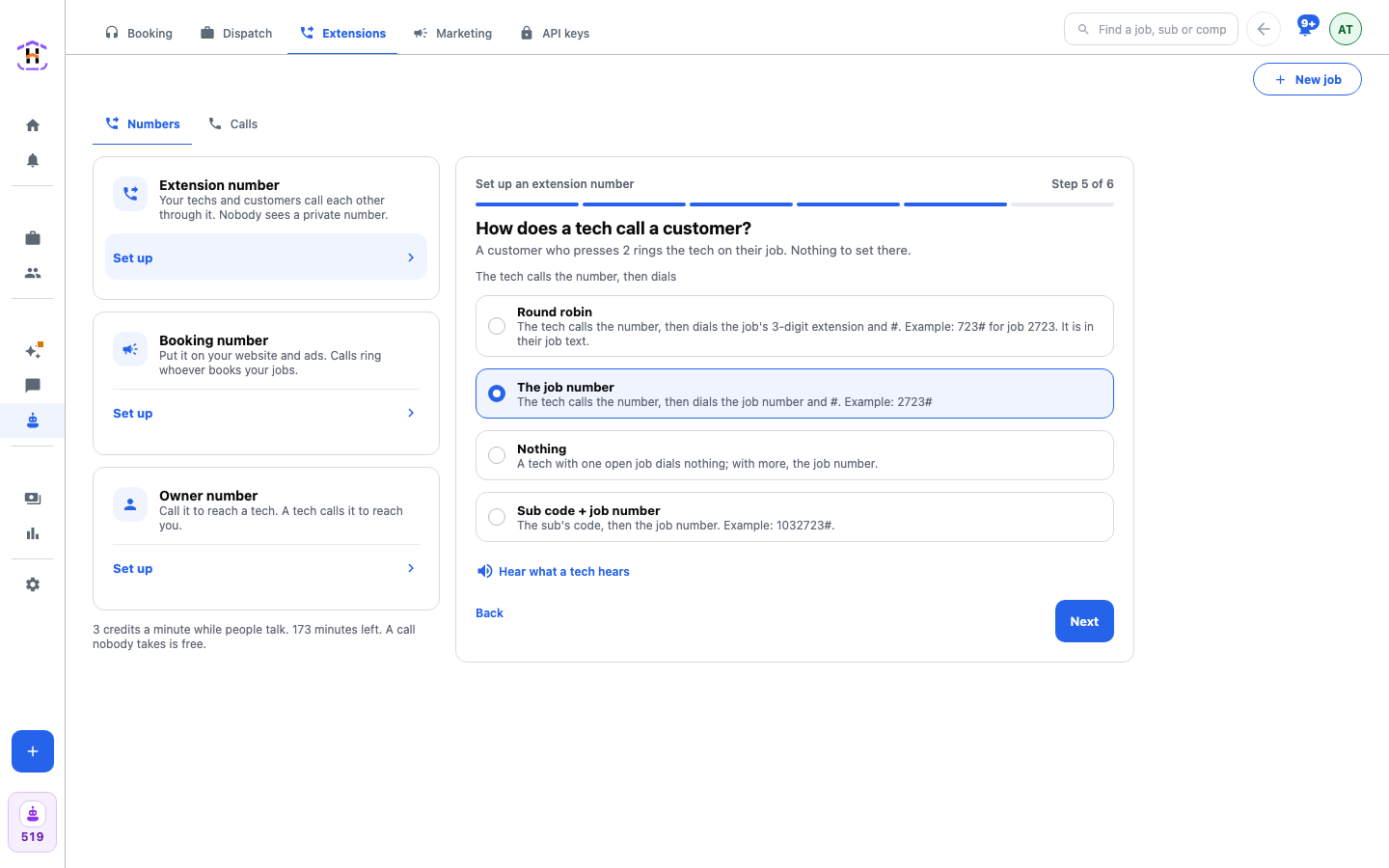
How a Tech Dials
The tech calls the number first. What happens next depends on the method you pick. The choice is the same for all your numbers.
| Method | What The Tech Does |
|---|---|
| Round robin | Dials the job's 3-digit extension and #. Example: 723# for job 2723. It is in their job text. |
| The job number | Dials the job number and #. Example: 2723#. |
| Nothing | A tech with one open job dials nothing. With more than one, the job number. |
| Sub code + job number | The sub's code, then the job number. Example: 1032723#. |
On the number's page, Tell your techs writes the instructions for the method you chose. Press Copy this and paste it into a message. For the code methods, the Tech codes section lists each tech with Give a code or Change, and Give everyone a code does it for all. A tech on a phone you do not have on file presses 2 first.
What Customers Hear and Press
A customer who calls the number back hears the greeting and the music. Pressing 1 rings the people you picked. Pressing 2 rings the tech on their job; there is nothing to set. If nobody is picked for 1, the owner's phone rings. A caller the system does not know goes to The menu or Your team, whichever you set under A caller we don't know goes to.
Each number has its own sound: the greeting (your business name, a recording you upload, or none) and the music (a tune from the list, or Upload your own music). MP3 or WAV, kept short.
To test it, press Call me to test. Your verified phone rings.
Booking Number and Owner Number
The Booking number is the number you put on your website and ads. Calls to it ring whoever books your jobs. The card includes Put it on your website, with a Guide with pictures link.
The Owner number works the other way. You call it and key a tech's code, then #, to reach that tech. A tech calls it to reach you. Your own number stays private. You can also press a tech's phone on the Team page, with no code.
The Calls Tab and Recording
The Calls tab lists every call that went through your numbers, newest first. Search by a name, a job number, an extension or a tech. Pick a tech with the Tech list. The chips All, Missed and Recorded narrow the list. Missed shows the count for the week.
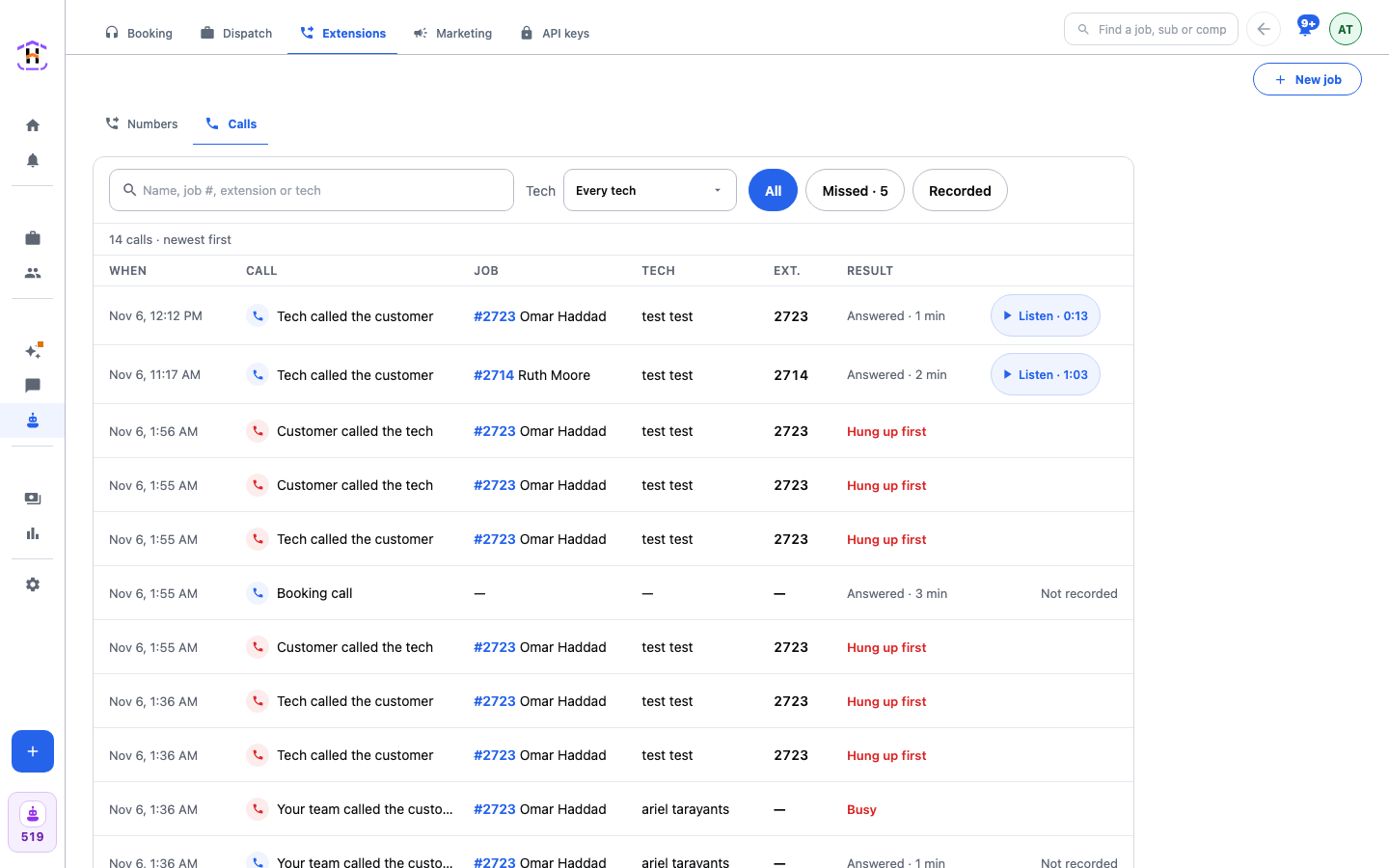
Above the list, once you have a number set up, is the Record calls switch. Under it: Both sides hear "This call is recorded." When it is on, every call through your extension numbers is recorded, and both people hear that notice. A recorded call shows Listen with its length. Press it and the recording opens in your phone's own player. Calls from before you turned it on say Not recorded. A recording that is still arriving says Recording ready in a minute. One that failed says The recording was not saved. Recordings are kept and not deleted. Older ones are moved to cheaper storage and still play.
Recording calls is regulated. Read Can You Record Customer Calls first. It is not legal advice.
What It Costs
A call costs 3 credits a started minute while people talk. A call nobody takes is free. The page shows the price and how many minutes your credits cover. At zero credits calls do not connect; an Add credits button appears. The number itself costs credits each month too. See Phone Numbers and Credits And The Bill.
Do It Step by Step
Follow the setup tutorial, then Listen To Your Recorded Calls.