Which Places Make You Money
The map answers one question: which places make you money, and which only cost you clicks. You choose how places are grouped, and every place figure on the screen follows that one choice.
Where to Find It
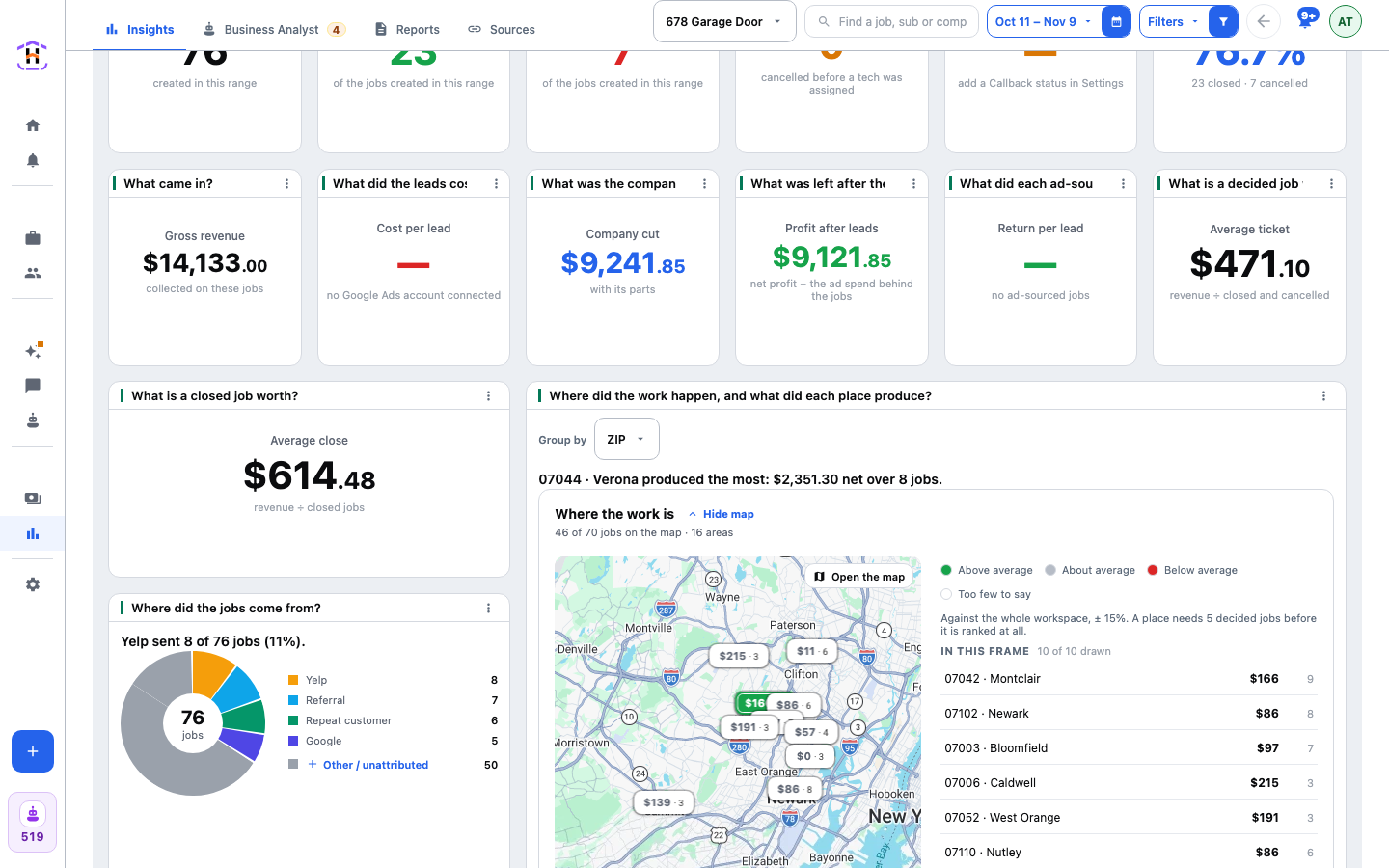
Open Statistics. On Insights, find the tile Where did the work happen, and what did each place produce? It opens with a Group by choice and a sentence naming the place that produced the most. Under it is the card Where the work is, with the map, a colour key and a list of the places in view. Press Hide map to fold the map away and Show map to bring it back. Press Open the map on the picture to pan and zoom it. Under the card is the table Every area, against the workspace.
For more controls, open Sources and press the small Map button at the top. That page is the same map at full height.
The Controls
- Group by. ZIP, City, State or Call area. It sits at the top of the Insights tile and on the Map page. The default is ZIP.
- View. On the Map page only. Places adds all the jobs in one spot together. Every job draws one dot per job: red lost money, green made money. Group by shows only in the Places view.
- Show. On the Map page only, in the Places view. What each marker prints: Net / job (what a job there is worth after the sub is paid), Closing rate (how often a job there gets booked) or Jobs (how much work came from there). On the Insights tile the markers print Net / job, then a dot and the number of jobs behind the figure.
It is one Group by setting for the whole panel. The map, the table, the area tiles on Insights, the CSV and the jobs behind a row all use it, so a place on the map and the same place in a bar list are the same group.
Jobs by ZIP Code and the Other Groupings
| Group by | A group is | A job it cannot place |
|---|---|---|
| ZIP | One ZIP code and its town, such as 62701 Chatham. A ZIP can cover several towns | A job with no address |
| City | A town and its state, such as Springfield, IL. Town names repeat across states | A job with no address |
| State | One state | A job with no address |
| Call area | The area code of the customer's phone, labelled with the town most of its jobs are in, such as 217 Springfield, IL | A job with no phone |
Call area is the area code of the customer's phone number, not where a call tracker said the caller was. It is useful when the customer lives in one place and the job is in another, or when an address was never typed in. A job a grouping cannot place becomes a row of its own, named "No address" or "No phone". It is never dropped.
Reading the Verdicts
Each place gets a verdict against the workspace average: Above average, About average, Below average or Too few to say. A verdict needs 5 decided jobs. A place with fewer shows its figures and declines to be ranked. This is on purpose. Two bad jobs in a ZIP is a story, not a finding.
The Table Under the Map
The table is on the Insights tile, under the map. It is called Every area, against the workspace. Its columns are Area, Jobs, Closed, Closing, Avg ticket, Net profit, Net / job, vs workspace and Last job. It is sorted by net profit. Press a column name to sort. Press a row to open the jobs behind it. The table pages instead of folding, so the sixth ZIP is never hidden under Other.
The Map page has no table, only the map and the list of places in view. The map is a convenience. The table is the claim. If the map cannot load, every number below it still stands, with a line saying how many jobs could not be drawn.
What This Does Not Tell You
The map reports where money was made and lost. It does not tell you to raise a bid, add a ZIP or drop one. How you change your ads is your call, or your ads person's.
Why It Matters
A place with a lot of jobs and a low Net / job is spending your time. A place with few jobs and a high Net / job may be where your next job should come from. The method is in How to Find Your Best ZIP Codes. For the whole picture, read Cost Per Booked Job, Explained. The call area idea has its own glossary entry.