Your Business Phone Numbers
Where the Screen Is
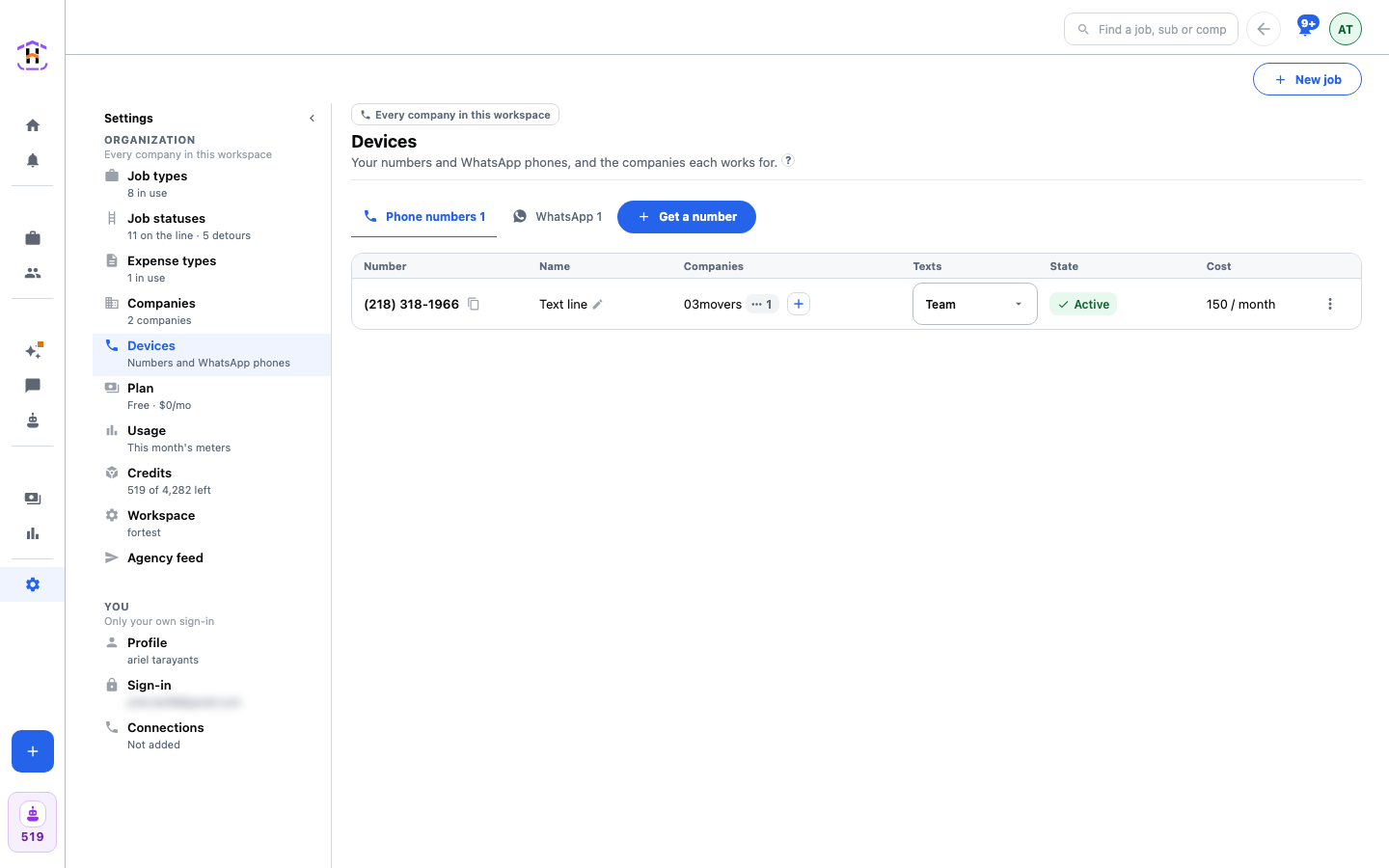
Open Settings, then Devices. The first tab is Phone numbers. The second is WhatsApp, where you link a phone. This page is about the first tab. It lists every number your workspace holds, the companies each one works for, and what it costs.
Getting a Business Phone Number
Press the blue Get a number button at the top. If you run more than one company, a small window first asks Which company is the number for? Pick one and press Continue. You can add the number to more companies afterwards.
The next window is also called Get a number. It shows numbers near you, with a row of area codes to press. If you want a different area, type three digits. Show more lists more numbers in that area code. If none are free it says No numbers in that area code.
Pick the number you like and press the button that now reads Get followed by the number, such as Get (469) 555-0144. The number is yours at once. The first number your workspace ever gets has a free first month. The window says so before you press.
The Phone Numbers Table
Each row is one number. These are the columns, in the words on screen.
| Column | What It Tells You |
|---|---|
| Number | The number, with a copy button. Under it you may see 3 not placed this week: texts that came in and could not be matched to a company or a job. |
| Name | Your own label. Press Add a name to type one, such as "Dispatch line". |
| Companies | Which companies the number works for. One number can work for several. |
| Texts | Who the number texts: Team or Customers. Team means your techs and subs. Team is the setting to use today. |
| State | Active, or Paused with a Top up link. |
| Cost | Free, or the credits it costs each month, like 150 / month. |
The three dots at the end of a row open a short menu: Rename, Use for calls and Give back. Use for calls opens the setup for an extension number with this number already picked. A number that texts can take calls too.
What a Number Costs
A number costs automation credits each month, not dollars on a separate bill. The prices below are the ones in the app today, from the price list the app reads.
| Month | Credits |
|---|---|
| First month of the first number you ever get | 0 (free) |
| Second month of that first number | 75 |
| Every month after that, and every later number | 150 |
A number keeps the price it was bought at. Numbers bought before the credit price existed stay free. Giving a number back and getting it again does not start a second free month. Where credits go, and how to read the bill, is on Credits and the Bill.
A text to a tech or a sub costs 1 credit, whether an automation sends it or you type it. See Texts And Messages.
When a Number Is Paused
Each month the number is paid for in credits. If the workspace has too few credits, the number shows Paused. A paused number stops sending, but you keep it. Press Top up in that row to go to Settings, Credits. When credits are back, the number is Active again.
Giving a Number Back
Open the three dots and press Give back. The window warns that the number stops working for every company it works for, and that its monthly credits stop. Press Give back again to confirm.
Do It Step by Step
The tutorial Get A Number For Texts walks the first number from start to a working text. To take calls on it, follow Set Up An Extension Number.